
Product Description - Turf Tank Control App
The Turf Tank App allows you to create sports fields and other features in your specific location for the Robot to paint. The App itself will guide you through the required steps and provide help along the way.
This manual provides a brief overview of the App’s features and its Home Screen.
Home Screen
The Home screen only displays the view shown below when the Tablet is connected to the Robot WiFi, and therefore the App is connected to the Robot. App features are limited when it is not connected to the Robot.
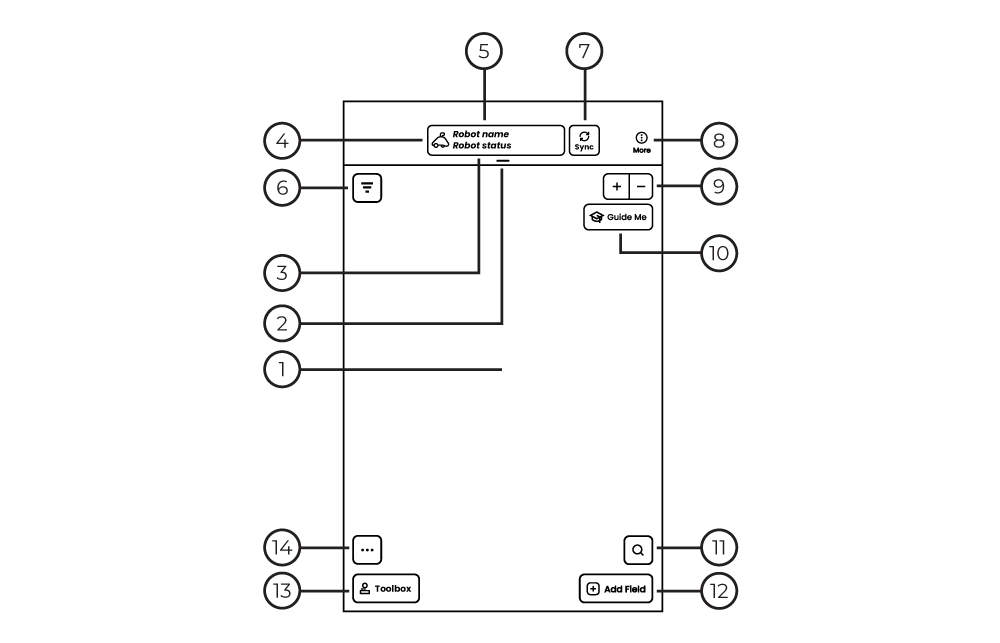
Map The physical area where your fields are and where you can place fields.
Dashboard A detailed display of Robot performance. (Swipe down to expand.)
Robot Quick Status Examples: “Running Job,” “Idle,” “Cleaning,” “Updating,” “System Error.”
Health Robot Picture: Green: Robot Health is good. Red: Robot Health is bad, check error messages?
Robot Name Displays name of the connected Robot.
Tag Filter Displays layouts by selected tags
Sync Upload fields and layouts to cloud storage.
More Access Settings, Fields List, and other options.
Zoom Zooms map in and out
Guide me Small guides to get started
Field Search Search for a field by name or tag.
Add Field Choose field layouts and drag onto the Map.
Toolbox Manually steer the Robot by Joystick or Keypad, start/stop the Sprayer, lower/raise the Spray Discs.
Quick Action Menu Select Quick Actions like Priming, Cleaning, Find Robot, Find Tablet.