
Power On the Base Station

Attach the Base Station to the Tripod before turning on the power (see “Mount the Base Station on the Prism Pole”).
DO NOT move the Base Station with the power on.
Press the Power Button.
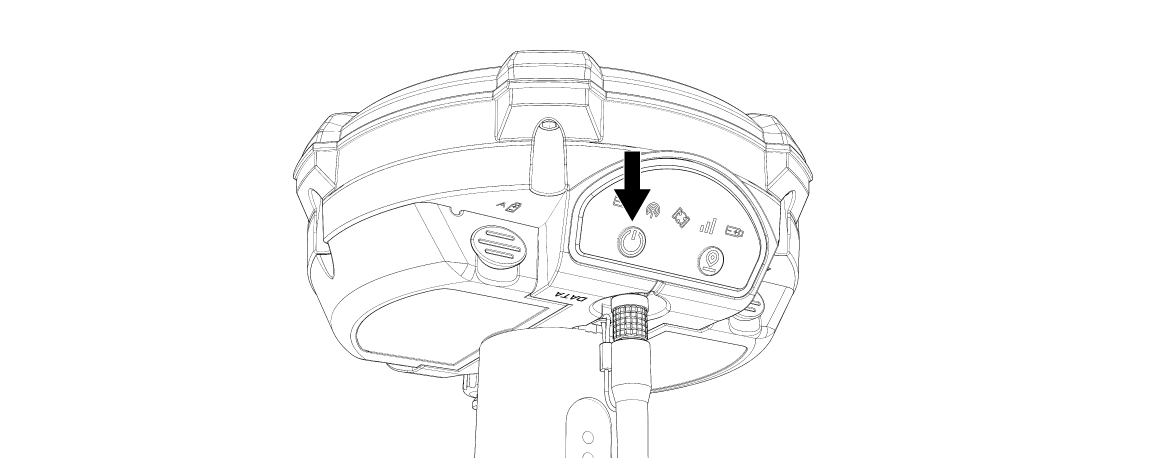
Power Button
On startup, the Base Station automatically searches for a Saved Position. The orange Position light flashes to indicate the search.
Searching for a Saved Position
To search for a Saved Position at any time other than startup, press the Position button.
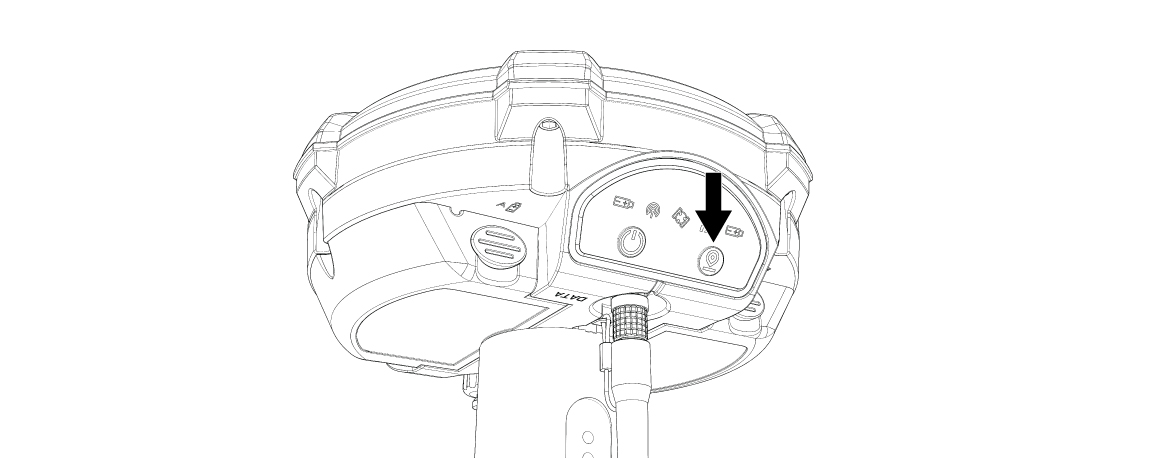
Position Button
When the Base Station has found a Saved Position, it will:
Show a solid orange Position Light.
Show a flashing blue Transmission Light.
Emit five beeping sounds.
If the Base Station does not detect a Saved Position, it will:
Show no orange Position Light.
Show no blue Transmission Light.
Emit a five-second continuous error tone.
A Saved Position must be created before the Base Station is ready to use. Please see CREATE A SAVED POSITION.
Battery Indicator
The Battery Indicators on the Display show which battery is in use:
The Base Station uses only one LP-E6 battery at a time.
Only the indicator light for LP-E6 battery currently in use will be lit.