
Start the Robot

Battery must be inserted before the Robot can be turned on. Install Robot Battery
Press and hold the POWER button on the Control Panel (button 2 in the figure below) for three seconds.
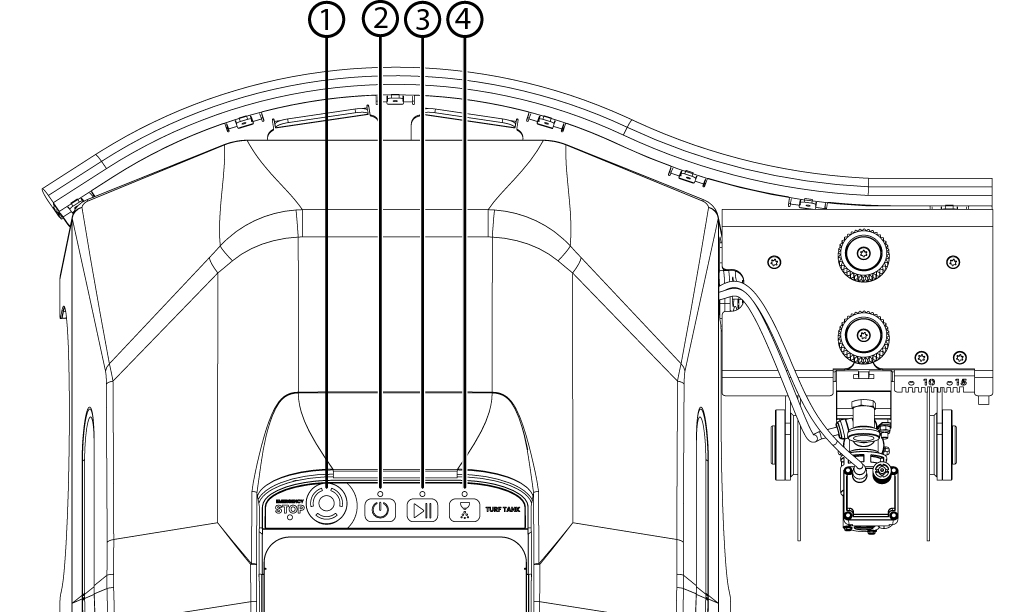
The POWER button is number two in this Control Panel illustration.
The LED light will pulse green as the system boots up. When the Robot is ready, the POWER LED will turn solid green. Other messages provided by the POWER LED are listed below.
Button | State | Meaning |
|---|---|---|
Power  | Pulsating Green | Robot is starting up. |
Solid Green | Robot is fully powered up and active. | |
Blinking Red | Robot is in an unrecoverable error state. Restart required. | |
Pulsating Orange | Robot is updating. |